RepGate — Exercise for Screen Time
RepGate is a cross-platform parental control app built in Flutter. The core mechanic is simple: a child completes a verified exercise session, and the app unlocks a set amount of screen time. Parents configure the rules — exercise type, duration, credit ratio — and RepGate enforces them through native OS APIs on both platforms. It has been in active development since November 2025 and was approved by Apple as of May 2, 2026, as the first app version submitted to them.
Exercise Verification
The app uses your phone's camera and AI to count reps in real time. It tracks your joints—like hips and knees for squats—to make sure you're doing the exercise correctly. All of this happens directly on your phone; no video or private data is ever sent to the internet.
 RepGate uses on-device AI to count reps without sending video to the cloud.
To prevent cheating, the app takes a random photo during each set. Parents can check these photos later to make sure the workout was real. The photos are low-resolution to keep things private.
RepGate also works with Strava. If you already track your runs or bike rides there, the app can import them and give you screen time credits automatically.
The app also supports Grease the Groove: short, frequent mini-sessions spread across the day rather than one long block. A Coach can schedule these at fixed intervals, and each mini-session awards a partial credit that accumulates toward a screen time unlock.
Native Screen Time Integration
On iOS, RepGate uses Apple's official "FamilyControls" to block and unblock apps. This is the most complex part of the app. I even sketched out how the background processes would communicate on the back of a math exam because I couldn't stop thinking about it.
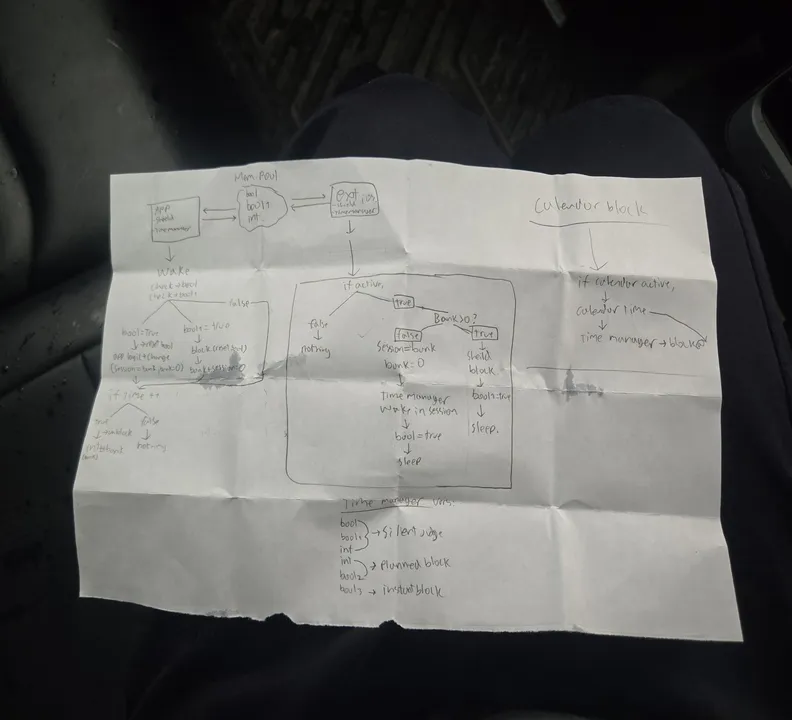 I sketched the entire background logic on the back of a math midterm—December 19.
The app has to talk to a separate, hidden "extension" that stays running even if you close the app. They share data through a secure container so they always know how much time is left.
Three Blocking Modes
Apps are only unblocked when three independent flags are all false. They stack:
- Usage limit (
isBlockActive) — set by the extension and ScreenTimeManager when the kid runs out of earned screen time. - Sleep mode (
isSleepBlocked) — set by the extension when a bedtime schedule fires. - Calendar strict (
isStrictBlocked/calendarStrictConfig) — fires for scheduled activities (run, swim, cycle). The shield color varies by activity type: Crimson, Ocean, or Forest. - Task strict (
isStrictBlocked/strictActivityLabel) — fires when a Coach assigns a remote task. Shield color: Deep Violet.
The reason for three separate flags rather than one is that each mode has a different trigger and a different owner. If sleep mode turns on while the kid still has credit, the credit stays in the bank — it isn't consumed. When the bedtime window ends, the extension clears isSleepBlocked, checks whether the other two flags are also false, and only then removes the shields.
The Bank and Ladder
The DeviceActivity API tracks cumulative app usage within a daily schedule window — it has no concept of a countdown timer. To build one, I chunk sessions into 30-minute blocks, each with per-minute threshold events. When a chunk expires, the extension wakes, checks the bank balance, and schedules the next chunk without the main app running.
When a kid earns time — say 90 minutes from a push-up session — Dart calls addToBankBalance(5400), which writes next_session_bank = 5400 to the shared UserDefaults. When startMonitoring is called, ScreenTimeManager checks whether the total exceeds 30 minutes. If it does, it schedules the first 30-minute chunk and writes the remaining 60 minutes back to next_session_bank. Shields are removed and the kid can use apps freely.
Inside each 30-minute chunk, the system registers one DeviceActivity event per minute: min_1 at 60 seconds, min_2 at 120 seconds, through final_rung at 1800 seconds. As each minute fires, the extension wakes, updates currentSessionDuration in the shared container (so the UI countdown stays accurate), and sends warning notifications at 10, 5, and 1 minute remaining.
When final_rung fires, the extension checks the bank. If time remains, it immediately schedules the next 30-minute chunk and removes the shields — no app process needed. If the bank is empty, it applies shields via ManagedSettingsStore, sets isBlockActive = true, and sends a "Time's Up" notification. When the kid exercises again, extendCurrentSession() credits new seconds and restarts the ladder from the current position.
The full extension communication flow, sketched on the back of a midterm exam paper — December 19, right after the exam.
Sleep Mode
Sleep runs on a completely separate DeviceActivitySchedule (repgate.sleep) with no per-minute ladder — just intervalDidStart and intervalDidEnd. When bedtime starts, the extension sets isSleepBlocked = true and applies shields. When morning comes, it sets isSleepBlocked = false and lifts shields if neither of the other two flags is active. Both fire without the app running.
On Android, screen time is tracked through UsageStats. The app reads per-app foreground time from the system and compares it against the credit balance. When time runs out, the app brings itself to the foreground with a block screen. It is a less seamless integration than the iOS path — Android doesn't give third-party apps an equivalent to FamilyControls — but it works without device ownership or MDM enrollment.
Beyond session-level credits, Coaches can set bedtime schedules (a nightly window where all gated apps are locked regardless of credits) and permanently ban specific apps from ever being unlocked.
Teams: Family and Peer Modes
RepGate supports two team structures. In Family mode, a parent is the Coach and one or more children are Players. The Coach sets all rules — which apps are gated, how many reps unlock how much time, bedtime schedules — and monitors activity through the dashboard. Players can't change their own rules.
Peer mode removes the hierarchy. All members are equal: anyone can set a shared goal, and everyone is accountable to the group. This is designed for friend groups or coworkers who want mutual accountability rather than parental control. The leaderboard in Peer mode is competitive, ranking members by total reps completed.
Backend
The backend runs entirely on Firebase. The top-level Firestore collections are users, families, pairing_codes, and strava_tokens. Credit ledgers and session history live in subcollections under each user document. Families link a parent account to one or more child accounts.
There are 30 Cloud Functions handling: session validation, credit issuance, Strava webhook ingestion, RevenueCat webhook processing, scheduled daily credit resets, COPPA-compliant data deletion, and a family invite flow. Functions that touch financial or sensitive data run with tighter IAM scoping than the rest.
Subscriptions
Monetization runs through RevenueCat with two products: pro_repgate (single-family subscription) and family_repgate (extended family plan). RevenueCat webhooks hit a Cloud Function that updates the user's entitlement record in Firestore. The app reads entitlement state at startup and gates features accordingly — multi-child support, Strava import, and advanced scheduling are paywalled.
Compliance
Because RepGate handles data for children under 13, COPPA applies. The app routes child accounts through a parent-consent flow before any data is collected. The Firestore schema keeps child data namespaced under the family document, and the deletion function removes all child records when a parent deletes the account. GDPR deletion requests follow the same path. The privacy policy and terms were written to reflect exactly what data is collected, where it goes, and how long it is retained.
The app is localized into four languages: English, French, Spanish, and Chinese (Simplified).
Status
As of May 2, 2026, the app has been approved by Apple as the first app version submitted to them. The Android build is functional and in internal testing. Legal and tax structures are being finalized in parallel. repgate.app is live with a waitlist and early-access form.
Files & Links
Built at 17 years 1 month